How to install Korrah in MyDocSafe client portals?
AI assistants are becoming essential tools for improving client experience, reducing operational workload, and speeding up internal processes. With Korrah, the AI assistant built by AI4U.digital, you can now embed a fully customised, domain-trained assistant directly inside your MyDocSafe client portals — with no coding required. In this guide, we walk you through the steps to install Korrah, connect it to your knowledge sources, and publish it inside the secure portals your clients already use for onboarding, e-signatures, data collection, and document sharing.
Step-by-Step: Installing Korrah in MyDocSafe
Step 1:Create Your Korrah Assistant in AI4U
o We assume that you already have your assistant configured. If not, please read this article first and come back here when ready.
Step 2:Test and Fine-Tune Korrah
Before embedding the assistant into MyDocSafe, open the Playground and
Update tone or behaviour in the System Prompt
Ask typical client questions
Check accuracy scores
Correct or expand the knowledge base
Once you’re happy with the responses, move to the next step.
Step 3:Generate the MyDocSafe Integration Token
In AI4U:
Open your Project → AI Assistant
Click on the “…” icon for the selected assistant and select “View Details”.
Click on the Features tab. Then copy the Access Key— you’ll paste it into MyDocSafe in the next step. This token securely links your Korrah instance with your organisation’s MyDocSafe account.
In the “Assistant allowed domains” section, add “app.mydocsafe.com”
Step 4: Install Korrah in MyDocSafe
Inside your MyDocSafe dashboard:
You can select the Portal Group where Korrah will appear: each portal group can have a different agent
Go to Portals → Select your Client Portal Group → Settings
In the General tab, paste the Ai4U token in the “Ai4U Agent Code” section. Remember to click the “Save” button.
Korrah is now installed.
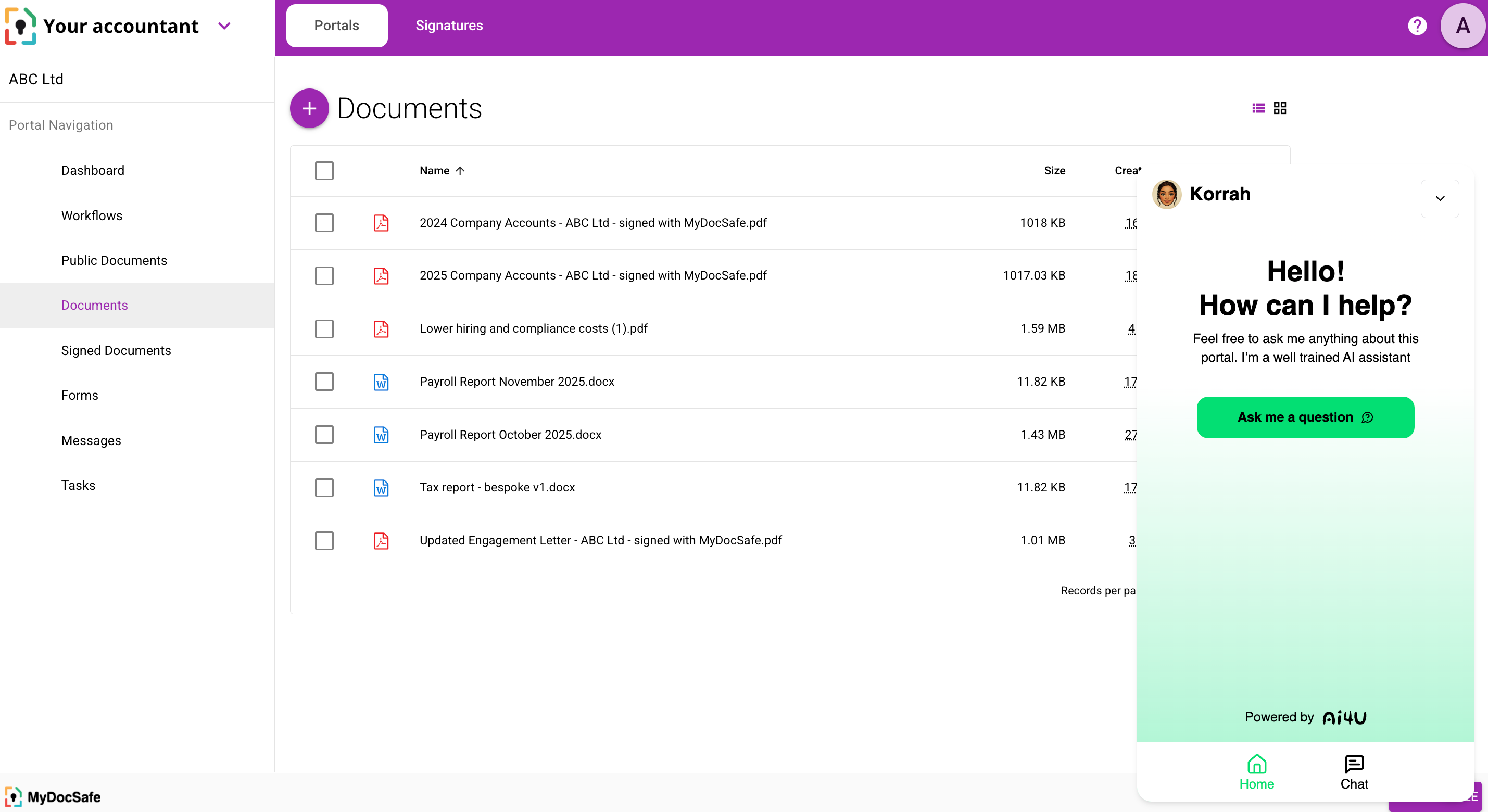
MyDocSafe and Korrah from Ai4U embedded in a client portal
Step 5:Publish and Monitor
Once live, Korrah becomes part of your onboarding or support journey.
From your AI4U dashboard, you can:
Monitor incoming user queries
See the accuracy score for each answer
Add new FAQs as organic questions appear
Update the knowledge base in real time
Adjust the prompt for improved tone and behaviour
Why Install Korrah Inside MyDocSafe?
Because the combination is uniquely powerful:
1. AI +Secure Portals
Your assistant operates inside a fullyencrypted portal system, maintaining privacy and professional integrity.
2. AI that understands your business
Korrah is trained entirely on your content —your workflows, your compliance, your documents.
3. Fewer repetitive questions
Clients get immediate answers, helping themcomplete onboarding, upload documents, or sign forms without delays.
4. Lower support burden
Your team can focus on higher-value tasksinstead of explaining the same things over and over.
5. Better client experience
Clients get clarity, speed, and guidanceexactly when they need it.
Summary
Installing Korrah from AI4U inside MyDocSafetakes only a few minutes, and the impact is immediate: less friction, betterclient service, and smarter workflows.